How to Format a TikTok Transcript Without Changing Its Words
By TranscriptNest · Published 2026-11-04
Keep the wording fixed and improve the reading path
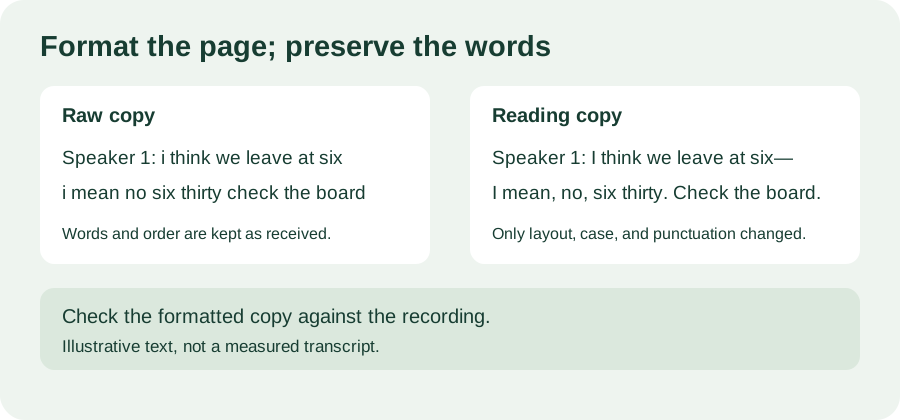
Start with an untouched copy. To make a TikTok transcript easier to scan without changing what was said, add clear speaker labels when you can identify the speaker, group each turn into short paragraphs, and apply punctuation consistently. Keep the same words in the same order. Do not silently correct grammar, remove filler words, or fill an unclear phrase from context. If you make a reading copy, label it as formatted or edited and retain the raw version beside it. This simple separation lets you improve the page layout while preserving a way to check every word against the recording.
Break the text at speaker turns, not at guessed sentences
A new paragraph at a speaker change gives the eye a stable place to follow the conversation. If a single speaker continues for a long stretch, use a paragraph break at a natural pause or topic shift, but avoid splitting a short phrase in a way that changes which words seem connected. Use one label style throughout, such as Speaker 1: and Speaker 2:. Add a label only when the voice is distinguishable; a transcript alone may not prove who a speaker is. For simultaneous speech, keep the lines separate and mark the overlap instead of merging the words into a fluent sentence.
Use punctuation as a visible editing choice
Speech does not arrive with commas and periods attached. A reader-ready copy may need punctuation, capitalization, and paragraph boundaries, but those are editorial marks. Decide on a small consistent rule before formatting: for example, capitalize the first word in a turn, use periods for completed thoughts, and use an em dash only when the audio supports a cut-off or interruption. Do not add a question mark just because a sentence sounds uncertain; replay it first. When the punctuation is interpretive, the raw transcript and a brief “punctuation added for readability” note make that choice transparent.
Worked example: change the layout, keep the words
Invented example, not a measured transcript. Raw text: “Host: i think the bus is at six i mean no six thirty check the board”. A formatted reading copy could be: “Host: I think the bus is at six—I mean, no, six thirty. Check the board.” The second line adds capitalization and punctuation and groups the same spoken words; it does not claim the speaker actually paused at that exact punctuation. Compare the word sequence before and after: I / think / the / bus / is / at / six / I / mean / no / six / thirty / check / the / board. If a formatting pass inserts, removes, reorders, or replaces a spoken word, it has moved beyond layout and should be reviewed as an edit.
Run a quick word-preservation check
Before sharing, read the formatted copy while listening to the source. Check names, numbers, negations, repeated words, and sentence endings; these are easy places for a clean-looking layout to hide a change. Then compare the raw and formatted word sequences, ignoring only the punctuation and capitalization you intentionally changed. If the sequences differ, inspect the difference instead of assuming it is harmless. Keep uncertainty labels where the audio remains unclear, and never use surrounding context as proof of a masked word. This is an editorial workflow, not a guarantee that a transcript is accurate.
Does formatting a transcript create subtitles?
No. Line breaks and speaker labels can help someone read a transcript, but subtitles or captions generally need timed cues associated with the media. A plain text layout does not add verified start and end times. Keep the word-for-word transcript, a formatted reading copy, and a timed caption file clearly named as different outputs.
Does this change what the transcription tool returns?
No. This guide describes a manual way to prepare a separate reading copy. TranscriptNest returns text from an uploaded audio or video file; this guide does not claim that the tool applies these punctuation rules, identifies speakers, or creates a timed caption file.