Should You Include On-Screen Text in a TikTok Transcript?
By TranscriptNest · Published 2026-11-09
Keep speech and on-screen words separate
A TikTok transcript should not silently turn text displayed in the video into words that someone said. Keep the spoken transcript faithful to the audio. If a visible label, instruction, or title adds information a reader would otherwise miss, add it in a separate, clearly labeled visual note. The W3C distinguishes a basic transcript of speech and relevant non-speech audio from a descriptive transcript that also includes visual information. That distinction gives you a useful format choice; it is not a TikTok-specific rule.
Choose the transcript type before you edit
Use a speech-only transcript when the goal is to preserve what people said. Use a descriptive transcript when important meaning appears only in the picture, such as a recipe amount, a location label, or a before-and-after result. A third option is to keep the transcript strictly speech-only and attach a separate visual-notes section. Pick one format before editing so a reader can tell whether every line came from audio or from the screen. W3C guidance says descriptive transcripts include needed visual information, and notes that text visible in a video may be missing from captions; it does not require every decorative word to be copied into every transcript.
Use a three-pass review for screen text
First, save the initial transcript unchanged. Second, replay the audio and correct only words you can hear. Third, review the video with sound muted or paused at key moments and list visual text that changes the meaning. Compare the list against the spoken transcript: if the same phrase is already spoken, do not duplicate it in the audio column; if it appears only on screen and matters, add a timestamped visual note. If text is too small, obscured, or fleeting to read confidently, mark that note as unreadable or omit it rather than reconstructing it from context. This is an editorial workflow, not an automated feature claim.
Invented example: keep a visual amount out of the spoken line
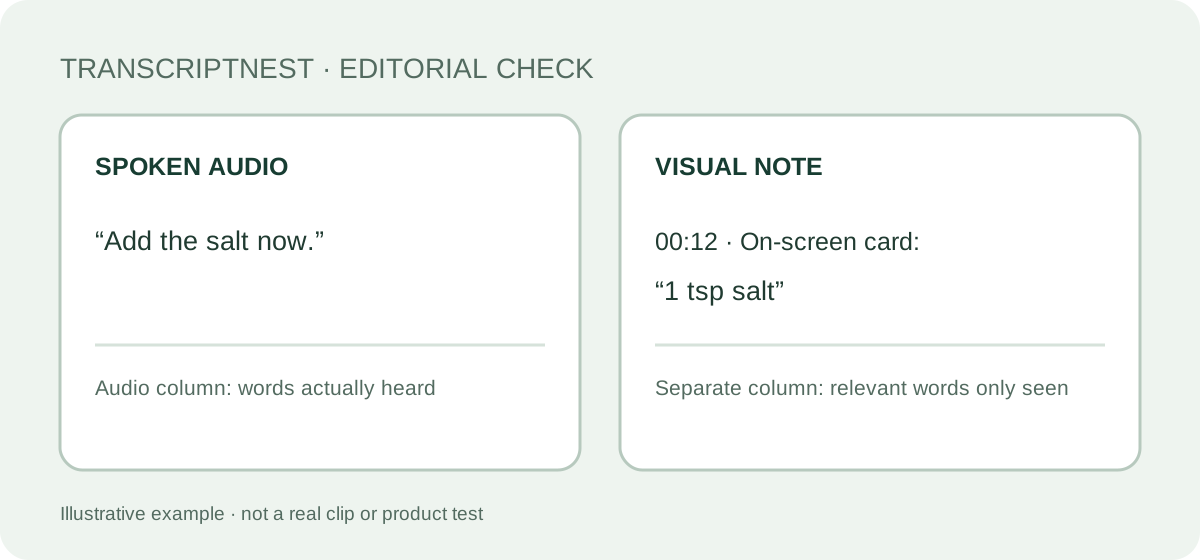
This example is invented and is not from a real TikTok or a tool test. Imagine a cooking clip where the speaker says, “Add the salt now,” while a card on screen reads “1 tsp salt.” A speech transcript contains only the spoken instruction. A descriptive version could add a separate note such as “00:12 — On-screen card: ‘1 tsp salt.’” Do not rewrite the speaker’s sentence as “Add one teaspoon of salt” unless those words are actually spoken. The separation lets a reader use the visual detail without mistaking it for dialogue.
Do not repeat a caption just because it is visible
A sentence can appear as burned-in captions, a title card, a comment overlay, or a label. Ask whether it duplicates the speech or supplies a distinct visual fact. If it duplicates the speech, keep one copy in the transcript and label its source only if that distinction matters to your project. If it adds context, place it under a Visual note or in a separate Audio and Visual table. W3C presents descriptive transcripts with audio and visual information in distinct columns, which is one workable way to preserve provenance. The column layout is a suggestion for clarity, not a required standard for TikTok clips.
Use timestamps only where they help someone find the visual
A timestamp can connect a visual note to a short-lived overlay, but a timestamp on every spoken phrase may make a plain reading transcript harder to scan. W3C says timestamps may be added when useful and can be less granular than captions. For a quick clip, note the moment an important graphic appears or disappears; for a longer recording, use consistent time points that help a reviewer return to it. Check each time against the actual player before sharing. These are editing suggestions and do not imply that TranscriptNest generates timestamps or reads screen text.
What TranscriptNest has and has not been checked to do
TranscriptNest has not been verified to extract, recognize, or transcribe text that appears only on screen. This guide describes a human review method for a transcript after you inspect the video. Do not assume a result includes usernames, titles, labels, or other visual overlays unless you compare it with the source video. The site’s tool returns text from submitted media, but no OCR performance test was run for this page.
Should on-screen text go in quotation marks?
Only when your format uses quotation marks to distinguish a verbatim visual string, and keep it in a labeled visual note. A short label such as “On-screen text:” is often clearer than placing it in the spoken line. Follow a project’s own notation if it provides one.