How Should You Label Transcript Drafts Without Losing the Original?
By TranscriptNest · Published 2026-10-23
Keep the first transcript unchanged, then label each edited copy consistently
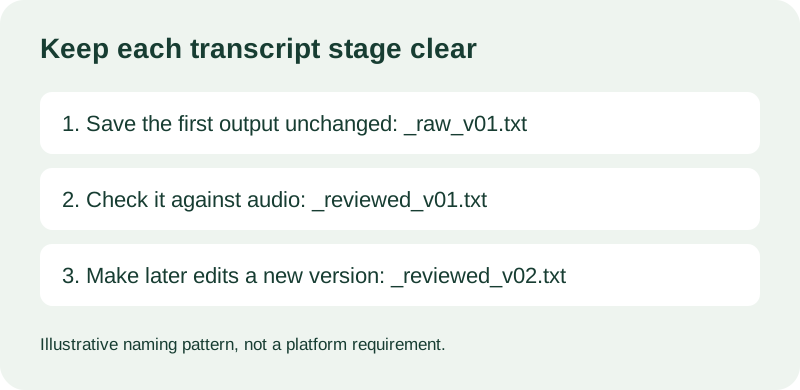
A practical transcript archive has one untouched first output and a separately named review copy. Use a predictable pattern such as YYYYMMDD_topic_status_v01.txt, keep the real .txt extension, and change the status or version when you create a new copy. For example, 20261023_product-launch_raw_v01.txt can hold the first output and 20261023_product-launch_reviewed_v01.txt can hold corrections checked against the audio. These are illustrative names, not a TikTok requirement or an official archival standard.
Why separate raw and reviewed text
If you edit the only copy, you lose a simple way to tell what the transcription tool first returned. Keeping that first output untouched lets you compare a later correction with the original instead of relying on memory. A reviewed copy should mean that someone checked the wording against the recording; it should not mean that every word is certainly correct. If review is incomplete, use a status such as review-in-progress rather than calling the file final.
Choose fields that answer the questions you will ask later
A useful filename answers four retrieval questions: when was this transcript made, which recording or project does it belong to, what stage is this copy at, and which revision is it? Put the date first if chronological sorting matters. Use a short topic or an internal recording ID that distinguishes similar clips. Add a status such as raw, reviewed, or needs-check, then a zero-padded version number if you expect multiple edits. Avoid putting private names or sensitive story details in filenames that may be synced or shared.
A worked naming pattern for two clips from one day
Illustrative example: suppose you transcribe two recordings for a project on the same date. Name their first outputs 20261023_launch-clip-a_raw_v01.txt and 20261023_launch-clip-b_raw_v01.txt. After checking the first recording, save 20261023_launch-clip-a_reviewed_v01.txt; if a later correction is needed, create reviewed_v02 rather than overwriting the earlier reviewed copy. The clip letters prevent a same-day collision, while the status and version make the relationship visible. This example describes a filing choice, not a test of a transcription feature.
Match the extension to the file and keep the pattern portable
TranscriptNest currently downloads transcript text as a .txt file. Keep that extension on the text output; do not rename a media file to .txt or change an extension to suggest a different format. National Archives guidance recommends descriptive, consistently structured names and discusses platform-independent characters and path limits for records management. Those recommendations are useful when files move between systems, but they are guidance for records workflows, not rules imposed on personal TikTok transcripts.
A short checklist before saving
Before you close the page, save the untouched output, make a separate copy for corrections, choose a consistent date and topic pattern, and use a status that reflects the work actually done. Open the saved file once to confirm that it contains the expected text and has the expected extension. If other people need to review it, include a short note outside the filename explaining what was checked. Keep the original recording and transcript together only if you have permission and a privacy-safe storage location.
Does a file called final mean the transcript is verified?
No. A filename is a label you choose; it cannot prove that the transcript matches the recording. Use a review status only after checking the text against the audio, and describe the scope of that check in a note if it matters. A clear name helps you find the right copy, while the actual review provides the evidence.