What Should You Write When a TikTok Transcript Has an Unclear Word?
By TranscriptNest · Published 2026-10-17
Replay the phrase and mark what you cannot confirm
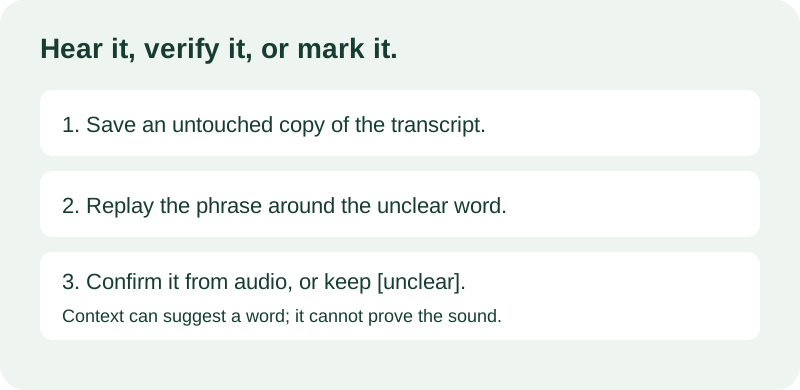
If one word in a TikTok transcript is unclear, replay the matching moment before editing. If you still cannot hear the word confidently, mark it in your working copy instead of replacing it with a plausible guess. A simple marker such as [unclear] tells the next reader that the sound was reviewed but the word was not confirmed. TranscriptNest returns plain text; copy or download the result before editing it in a text editor.
Do not hide different problems behind one marker
First identify what is uncertain. If speech is audible but two words sound alike, replay the surrounding phrase and compare the options with grammar and context; context can narrow choices, but it does not prove what was said. If the sound is masked or cannot be understood, keep an uncertainty marker. If the transcript ends before the audio does, that is a missing segment, not an unclear word. Preserve the original output so your correction can be checked or undone.
Pick one notation and explain it
There is no single notation that every transcript project must use. The Smithsonian Transcription Center asks its volunteers to mark speech that cannot be understood as [[unintelligible]]. The Archives of American Art style guide uses [inaudible] or [Inaudible.] in its own transcript conventions and describes how later corrections can be shown in brackets. These are house styles for their collections, not a universal TikTok rule. For a personal working copy, choose one clear marker, use it consistently, and do not imply that your marker is an official platform label.
Worked example: context is not proof
This is an invented example, not a measured transcription. Imagine the speaker says, 'Put the [unclear] beside the blue box.' You hear a short noun but cannot tell whether it is 'label' or 'letter.' Replaying the phrase may help. If it remains indistinct, keep [unclear] in your edited copy. Do not choose 'label' only because labels often go near boxes. The sentence may sound natural either way, but only the audio can support the word.
A careful review sequence
Save an untouched copy of the generated text. Replay a short stretch before and after the uncertain word, then listen once at normal speed and again with headphones if available. Write down the candidates separately. If one is clearly audible, update the working copy and leave a note that you checked it against the recording. If neither is clear, keep your marker. A second listener can offer another opinion, but record it as a review suggestion until the source audio resolves the uncertainty.
Names and technical terms need extra care
A speech recognizer may turn a person's name, product name, or specialist term into a familiar common word. Search a name list or source document only as a clue, then replay the audio. If the sound supports a spelling but you cannot verify the intended spelling, distinguish a phonetic guess from a confirmed correction in your notes. Avoid silently changing a name because one spelling looks more familiar.
Keep uncertainty visible when you share
The current page provides copy and plain-text download after a successful transcription. It does not provide an editing or uncertainty-marking control inside the result box, so save a copy and make editorial changes in your own text editor. Keep your edited version separate from the untouched machine output. That makes it easier to show which words came from the model and which were reviewed by a person.