Why Is My TikTok Transcript Incomplete? Check Before You Retry
By TranscriptNest · Published 2026-10-15
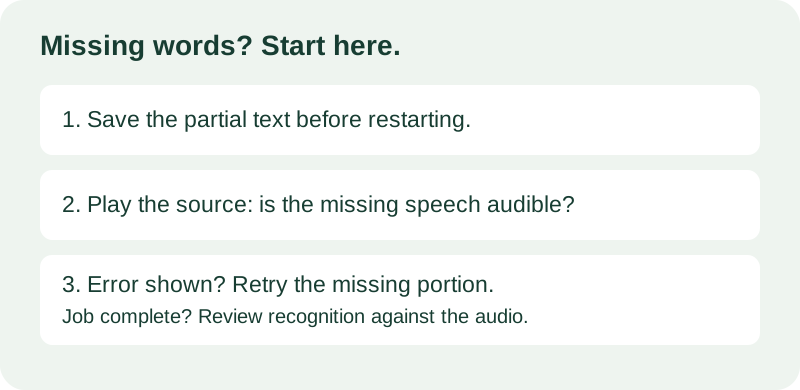
Save the text first, then find the missing speech
If a TikTok transcript stops early, copy the text that already exists before refreshing or starting again. Compare the last written sentence with your source recording. Then determine whether the source is missing audio, processing stopped, or speech recognition missed words. A retry can help an interrupted job, but it cannot recover speech that is absent from the file. TranscriptNest's TikTok tool accepts a saved audio or video file; it does not import TikTok links.
Check what you actually uploaded
Play the exact file you selected, including its ending. A shorter export or a recording with muted audio can look like a transcription failure. If the spoken ending is missing from that file, find an authorized original that contains it. If the ending is audible, note a few words from it and look for them in the transcript. Do not use the final punctuation mark as proof that the entire recording was processed.
Separate interruption from recognition errors
TranscriptNest prepares audio in the browser and sends it to Cloudflare in segments. Its current client keeps text from completed segments in the result box. When a later segment fails, the status says the result is not complete and any displayed text is partial. The Copy and Download controls are enabled on successful completion; if they are unavailable after an error, manually select the visible text and save it in your own notes. Starting a new run clears the result box. Keep the tab open during processing.
Worked example: the ending disappears
This is an invented example, not a measured transcription result. Imagine your recording says: 'Rinse the leaves, dry them, then store them in a clean container.' Your saved transcript ends after 'dry them.' First play the file from that phrase to the end. If the storage instruction is audible and the tool reports an incomplete run, save the partial transcript and retry an authorized excerpt containing the missing ending. Include the preceding phrase so you can compare the join. If processing reports success but the phrase is still absent, listen carefully and add only the words you can actually hear. Label your correction rather than treating it as fresh machine output.
Worked example: two retries overlap
This is a second invented example. Your first saved excerpt ends with 'Keep the lid loose while it cools.' A retry begins with 'while it cools, and label the container.' Do not paste both outputs end to end: that duplicates the overlap. Listen to the source around the join, keep one occurrence of 'while it cools,' and check whether the speaker actually said 'and.' Keep the untouched outputs separately so you can reverse a mistaken edit. This manual reconciliation is useful even when both excerpts look grammatically correct. Smooth prose alone does not show that a transcript faithfully follows the audio.
A practical stop-or-retry decision
Use the location of the gap to choose your next action. If the file itself ends early, replace the source instead of repeatedly uploading it. If text stops at one point and an error is shown, preserve the output and retry only the missing authorized material when practical. If words disappear in several places while the job finishes, review those passages against the audio instead of assuming a network retry will repair recognition. If you cannot hear a word, write an uncertainty marker such as '[unclear]' in your edited copy. Do not fill the gap with a plausible sentence. Keep a short note stating what you changed, where in the recording it occurs, and whether the change came from listening or another source.
Why a smaller file may still fail
The site's product limits are 30 minutes and 200 MB. Those are rejection thresholds, not a promise that every smaller file works. Browser decoding depends on format support and available memory. A full-limit successful run has not been established. If decoding fails, use a file your browser can decode or split an authorized recording and review the joins. The tool returns plain text, not a finished timed subtitle track.
Can I recover the text after refreshing?
The current tool does not provide a saved-job recovery screen. Save visible text before leaving or restarting. If you have already lost the result, check your own downloaded files or notes before running another transcription. This guide does not promise recovery from the browser after the page has been closed.
Does a complete status mean every word is correct?
No. A completed processing run and a faithful transcript are different things. Review important names, numbers, negations and the final spoken sentence against the source. Keep your own review copy distinct from the unedited output, especially before quoting someone or publishing captions.