Why a TikTok Transcript Upload Can Use More Memory Than Its File Size
By TranscriptNest · Published 2026-11-12
The upload size is not the same as working memory
A TikTok transcript upload can use much more browser memory than the selected file's size because the browser decodes compressed media into in-memory PCM audio before the tool sends any transcription request. A 200 MB product limit is a file-size check, not a guarantee that every file below it fits every phone or computer. The exact peak memory depends on the encoded media, browser, device, and other open apps; this guide explains the current processing order but does not claim a tested device-memory threshold.
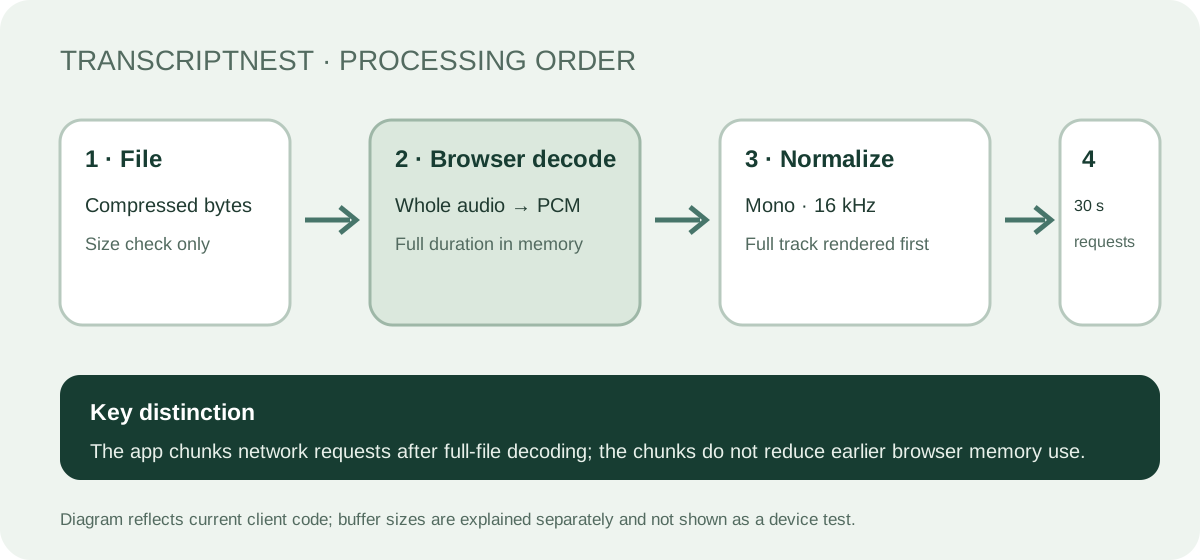
The current page processes the complete file before chunking requests
The current TranscriptNest upload client reads the selected file into an ArrayBuffer and calls AudioContext.decodeAudioData() on the complete file. It then creates a mono 16 kHz OfflineAudioContext for the full duration, renders the whole normalized track, and only after that starts sending 30-second WAV segments. This order matters: network requests are chunked, but the browser's initial decode and full-length resampling are not streamed segment by segment. The client code is the evidence for this site's present behavior, not a promise about other transcription tools.
Use a transparent estimate, not a claimed device requirement
A decoded AudioBuffer stores 32-bit floating-point PCM samples; MDN describes its sample rate, channel count, and in-memory representation. For one mono buffer, a rough raw-sample calculation is duration in seconds × sample rate × 4 bytes per sample. At the tool's 16,000 Hz mono normalization, a 30-minute track gives 1,800 × 16,000 × 4 = 115,200,000 bytes, or about 109.9 MiB using 1 MiB = 1,048,576 bytes. Inputs, the original decoded buffer, rendering intermediates, the file ArrayBuffer, browser overhead, and other apps can add memory. This number is a calculated size for one sample buffer, not a measured peak or a minimum device requirement.
Why a smaller file can still fail before transcription
Compressed file size and decoded audio size describe different things. A compact file can expand into many PCM samples, and the current client keeps the complete decoded audio available while preparing a second, normalized track. On a memory-constrained device, that preparation can be the pressure point even when the file is under 200 MB. The code has no per-device memory estimate or early memory check, so a file's extension and byte size alone cannot confirm that decoding will succeed.
A safe way to narrow down the stage
If you choose to troubleshoot an authorized recording, write down the exact status before retrying. “Decoding audio in your browser…” appears before the segment loop; “Transcribing segment 1 of …” means the first request has started. If decoding is where it stops, preserve the original and try a shorter copy made from media you may process, on the same device and browser. Change one thing at a time and note whether the short copy gets past decoding. This comparison can narrow the stage; it cannot prove the codec, memory threshold, or root cause by itself. Avoid repeatedly submitting the same large file if the device is already struggling.
Invented example: estimate one normalized buffer
This is a calculation example, not a real upload or device test. Suppose an authorized recording is 12 minutes long. At the client's 16,000 samples per second and one mono channel, one Float32 sample buffer would contain about 720 × 16,000 × 4 = 46,080,000 bytes, roughly 43.9 MiB. That estimate covers only one normalized PCM buffer. It does not include the compressed file, the earlier decoded audio, rendering copies, application memory, or the browser itself, so do not treat 43.9 MiB as the total memory needed.
What is verified and what is not
The page's source code verifies its current sequence: complete-file decode, full-duration mono resampling, then 30-second network segments, with a 200 MB file check and a 30-minute duration check. We have not measured peak memory across devices or tested a universal file-size threshold. MDN documents how browser audio buffers represent decoded samples; it does not establish the memory peak of this application on a particular phone. Keep a copy of any partial text and review output against the source recording.
Does 30-second segmentation prevent a decode-memory failure?
No. In the current client, segmentation happens after the complete file has been decoded and the full mono track rendered. It can divide the requests sent for transcription, but it does not make the earlier browser decode a streaming operation. A shorter source may reduce work, but whether it solves a particular device failure must be checked on that device.