TikTok Transcript vs Subtitles: What Does a Text File Actually Include?
By TranscriptNest · Published 2026-10-16
A transcript gives you words; subtitles also need timing
A plain transcript is readable speech text. A subtitle track pairs text with time ranges so a player knows when each line appears and disappears. If you need searchable notes or a quote, plain text may be enough. If you need words synchronized to a video, you need timed cues. TranscriptNest's current file transcription returns plain text; it does not export an SRT or WebVTT subtitle file.
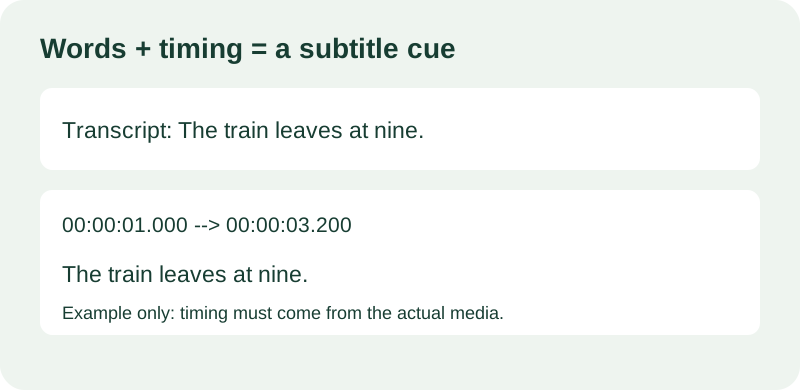
What a WebVTT cue contains
WebVTT is a text format for timed media cues. Its file starts with WEBVTT, followed by a cue start time, an arrow, an end time, and cue text. For example, a valid illustrative cue can look like this: WEBVTT 00:00:01.000 --> 00:00:03.200 The train leaves at nine. The sample sentence and its timing are invented for explanation, not transcribed from a test video. The cue times must increase, and each cue end must be later than its start. A transcript without a clock position does not contain enough information to invent accurate cue timings.
A quick way to choose the right output
Start with the job you need to finish. For searching, quoting, outlining, or editing a draft, keep a plain transcript. For captions, check that your editor accepts the subtitle format you plan to provide, then use time-aligned cues and review synchronization while playing the video. Do not paste paragraphs into a subtitle importer and assume it can infer the speaker's pauses. Sentence length and punctuation do not reveal exact start and end times.
Worked example: readable text is not synchronized text
This is an invented example. Suppose a clip contains two spoken lines: 'Meet me by the north gate.' Then, after a pause: 'Bring the blue folder.' A plain transcript can preserve both sentences in sequence. A subtitle file must also record when the first line begins and ends, when the pause occurs, and when the second line appears. If you do not have timing data, replay the source and mark the boundaries from the audio or video timeline. Never assign timestamps merely to make a file look complete.
Check the format before importing
Open the file in a plain-text editor before importing it. Look for the format header, time ranges, cue text, and blank-line separation expected by your chosen format. If you only see continuous prose, treat it as a transcript. Keep an untouched copy before editing. After import, play the result from the beginning and at each cue boundary; shifted captions can be misleading even when every word is present.
What this tool can and cannot provide
TranscriptNest accepts audio or video file uploads for TikTok transcription and returns plain text. Its current output does not provide speaker labels, word-level timecodes, or subtitle downloads. TikTok link import is not supported by this upload flow. If you need synchronized captions, use the plain transcript as a reading aid, then create and verify timing in a subtitle editor. The upload tool does not claim that this article's illustrative example was processed.
Standard reference: W3C WebVTT specification.